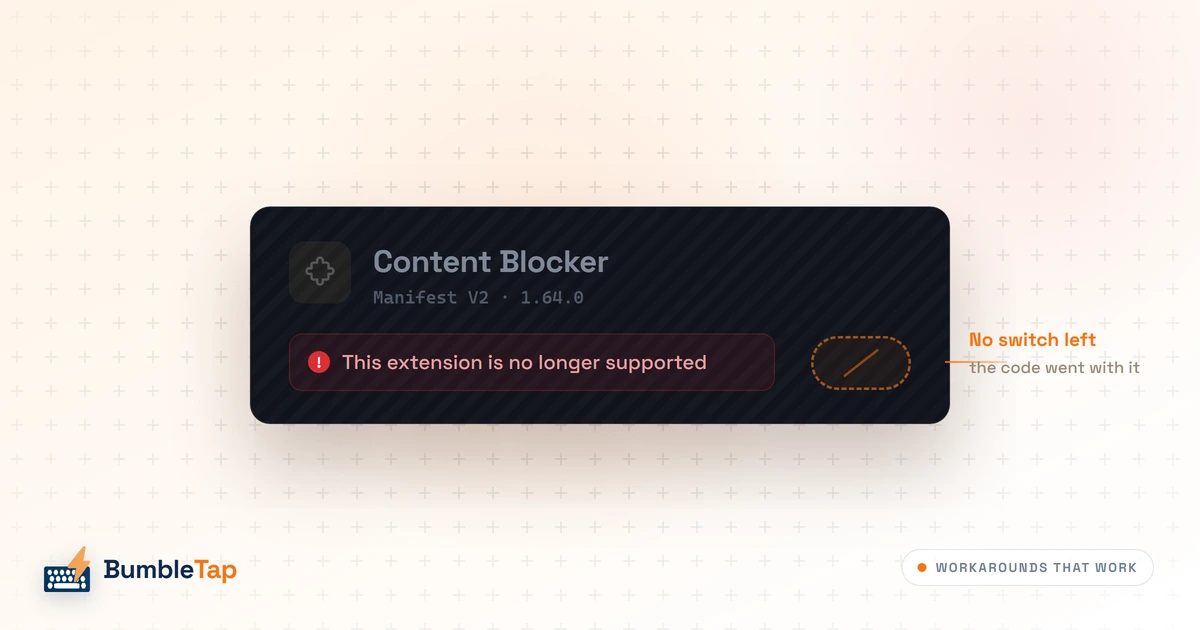
There's a greyed-out card on your chrome://extensions page, a line under it about the extension no longer being supported, and no toggle next to it. You searched for how to switch it back on. Half the results promise a fix.
They're stale. On stock Chrome, right now, there is no way to re-enable a Manifest V2 extension. Not a toggle, not an enterprise policy, not a chrome://flags entry, not a command-line switch, not developer mode, not a sideloaded .crx. Every one of those was a working answer at some point in the last two years, which is exactly why so many pages still describe them, and Google closed them one at a time in that order.
So this isn't a list of fixes. It's the four things you can do instead, ranked by how much I'd bet on each, plus the one people keep trying that I'd talk you out of. If you want the history of how the deprecation played out, I wrote that separately in what actually happens on August 31.
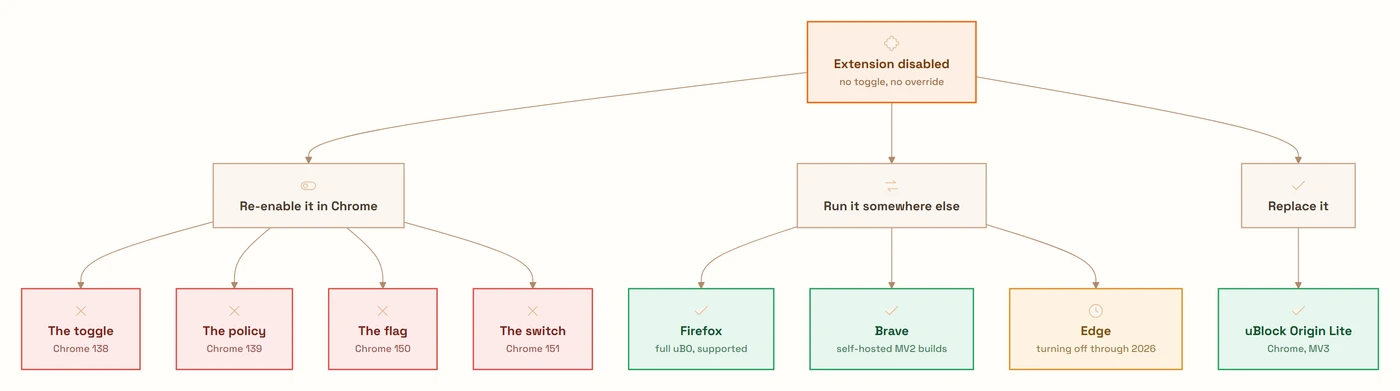
Every door, in the order it shut
Worth being precise, because the reason bad advice survives is that all of it was true once.
Chrome 138, July 24, 2025. Google's own timeline puts it flatly: "With Chrome 138 all users on all channels of Chrome have now Manifest V2 extensions disabled." The manual re-enable toggle went with it. This is the change that broke things for normal people. Everything after only affects the workarounds.
Chrome 139. The ExtensionManifestV2Availability enterprise policy, the admin override that had kept MV2 alive on managed machines, was deleted. That closed the last supported route for anyone.
Chrome 150, around June 30, 2026. The kExtensionManifestV2Disabled flag came out, with Google's commit rationale describing it as dead code. Fair enough: it had been the centrepiece of every "get uBlock Origin back" post for about a year.
Chrome 151, stable around July 28, 2026. The rest went. ExtensionManifestV2Unsupported, the remnants of ExtensionManifestV2Availability, and AllowLegacyMV2Extensions, which was the switch still letting a developer load an unpacked MV2 extension in developer mode. That last one is why "just clone the repo and load unpacked" stopped working too.
One detail from 151 matters more than the flag names, and it's usually reported backwards. Chromium didn't just disable those switches; it removed the code behind them, which is why there's nothing left for you to flip. What it did not remove is the machinery that loads an MV2 extension. That's still in the tree, which is why forks can keep MV2 running with a small patch rather than a rewrite. What 151 deleted was your ability to ask for it, not Manifest V2 itself, and I'll come back to what that's worth.
Then August 31, 2026: the Chrome Web Store deletes the remaining Manifest V2 listings. Nothing in your browser changes that day, because nothing has been running since 138. But the download link disappears, and that quietly kills several of the workarounds below.
Mine was uBlock Origin, the least surprising answer available. Chrome switched it off, I installed uBlock Origin Lite, and that was the whole drama. I stopped thinking about it, which is not the story the countdown posts were selling.
The thing you lost probably has a replacement, the replacement is probably slightly worse in a way you may never notice, and the gap between those two facts is where most of the panic lives.
Which problem do you actually have
The split isn't which extension you lost, it's what it did.
If it was an ad or content blocker, you have a real replacement and a specific, bounded loss. Next section.
Anything else — a userscript manager, a privacy tool, a page tweaker, some one-off utility from a GitHub repo — and your only question is whether the developer shipped a V3 build. Usually they did. Sometimes the project just stopped, and that's the case with no good answer.
If it's a work tool your company depends on, go find whoever owns it. The enterprise policy that used to buy you time was deleted a year ago, and IT may not have noticed yet.
uBlock Origin Lite is the answer, and it's a smaller answer
uBlock Origin Lite (uBOL) is by Raymond Hill, the same person who writes uBlock Origin. It's not a knock-off. Same filter lists, compiled at build time into declarativeNetRequest rulesets that Chrome's own network stack enforces, instead of JavaScript inspecting each request as it happens. That architecture is the point and also the constraint: the extension hands Chrome a rulebook and steps out of the loop.
It ships three modes. Basic needs no host permissions and blocks purely from the static rulesets. Optimal and Complete ask for broader access and enable progressively more cosmetic filtering, with generic cosmetic filtering only at Complete. Most people should raise it to Optimal and forget about it. The conservative default exists because gorhill would rather uBOL ask for nothing and under-block than ask for everything on install.
Here's the gap list, taken from uBOL's own FAQ rather than from critics:
- No dynamic filtering. The declarative API can't apply rules based on the top-level context, meaning the URL in your address bar, so uBO's medium mode — block third-party scripts everywhere except where I say — has no equivalent.
- No per-site switches. "No scripting", "no remote fonts" and "no large media elements" each depended on top-context awareness or on reading response headers. Gone.
- No element picker, no logger. You can't right-click an annoying element and zap it, and you can't open a request log to work out why a site broke. Custom filters landed in June 2026, but only for what compiles to
declarativeNetRequest. - Several filter syntaxes don't survive translation:
strict1p/strict3p, entity-based domain patterns,redirect-rule=, regexremoveparam=,replace=for rewriting a response body,ipaddress=, and click-to-load placeholders for embedded content.
Now my take. For most people none of that matters, and the internet's grief about uBOL is out of proportion to the daily experience of using it. You install it and the ads stop. I'd guess the majority of people who ran full uBlock Origin never opened the dynamic filtering pane once.
But "most people" is carrying real weight in that sentence, and the people it excludes are precisely the ones loud enough to write about it. If you ran uBO in medium mode, zapped elements with the picker, or reached for the logger first thing when a page broke, uBOL isn't a downgrade you'll adjust to. It's a simpler product wearing the same logo. Calling it a drop-in replacement is the claim I'd push back on, and gorhill never has.
There's a second-order cost people underrate. Because uBOL's rules are compiled and shipped through store review, a new anti-adblock trick can't be countered until a new version clears the queue and reaches you. Full uBO adapted through a filter list update measured in hours. That gap is structural, not a bug someone will close.
I still run Lite, and I don't have a horror story for you. Nothing on the sites I use daily has visibly slipped through in a way I noticed. Weigh that gap on the mechanism, not on a limitation I haven't personally hit. If your browsing lands on the sites that fight blockers hardest, you'll find that edge well before I do.
The second browser, and why Firefox beats fork-hunting
If you need the real thing, the answer is a different browser. The flavours of that answer are nowhere near equally durable.
Firefox is the strong one. Mozilla has publicly committed to supporting both Manifest V2 and Manifest V3, keeping the blocking webRequest API alongside declarativeNetRequest. Full uBlock Origin runs there unmodified: logger, picker, dynamic filtering, all of it. The difference in kind from everything below: it's a platform commitment about an API, not a patch someone maintains against an upstream that's actively deleting code. Mozilla hasn't promised a number of years and I wouldn't read it as eternal. It's still the only place where full uBO is a supported configuration rather than a thing that happens to still work.
Edge just stopped being the clever answer. For most of the past year, "use Edge" was the easy recommendation: Microsoft inherited Chromium's platform but not Google's schedule, and full uBO kept running there. On August 7, 2026, four days before I'm writing this, Microsoft named its dates: "Beginning in August 2026, Microsoft Edge will start the consumer transition away from Manifest Version 2." Notices first, then MV2 extensions gradually turned off by default, starting in Canary, Dev and Beta and broadening to Stable over the following months, with the goal of finishing for consumers by the end of 2026 and enterprise in early 2027. If you moved to Edge to keep an ad blocker, you bought about a year. I called it a reprieve rather than a plan in the earlier post, which was the right instinct and still too generous. I'll take the correction.
Microsoft's own numbers are the part I found most clarifying: 95% of the top MV2 extensions in the Edge Add-ons store have already migrated, 58 MV2 extensions with meaningful usage remain, and of those exactly three have no publicly available MV3 alternative. Three. That's the real size of the long tail everyone is arguing about, at least on one store.
Brave is the interesting one, with an asterisk you need to see. Brave hosts its own builds of four MV2 extensions, uBlock Origin, AdGuard, NoScript and uMatrix, and added automatic replacement of the Web Store copies with the Brave-hosted equivalents, carrying your settings across so nothing needs reconfiguring. That's more effort than any other vendor put in.
The asterisk is the scope. The issue that turned MV2 back on, #57155, is blandly titled "Disabled Extensions manifest V2 deprecation", but its body sets the terms: do not deprecate Manifest V2 extensions while they are still available on the Web Store (as of August 31, 2026). Read the date: that's the store cleanup, three weeks out from today. MV2 also appears to have broken in a 1.92.x build before being patched back, which tells you how much of this is Brave swimming against upstream every release.
That date is my reading, though, not Brave's position: the Web Store line explains why Brave acted just as well as it predicts when Brave stops. Both issues are closed and shipped in 1.92.x, and these are Brave-hosted builds that never needed the Web Store anyway.
Brave also blocks ads and trackers natively in its own network stack, so an extension blocker there is largely redundant. The MV2 support is for people who want uMatrix-grade control, not people who want ads gone.
Opera said in June 2026 that its position is unchanged and support continues "for as long as we can", which is honest and also not a commitment.
Chromium forks are still carrying it: ungoogled-chromium ships an extensions-manifestv2.patch in its core patch set that strips the deprecation checks and forces legacy extensions to stay enabled, and Helium carries the same patch downstream.
Apply the Chrome 151 detail here, though, because it cuts both ways. That patch is still small: ungoogled-chromium's tree sits on Chromium 151 today, and the diff is a few dozen lines across four files, most of it forcing ShouldDisableLegacyExtensions() to return false. Nobody is reimplementing a platform. The bet is that Google leaves that code in — it called the 150 removal dead-code cleanup — and that one or two volunteers keep rebasing. I wouldn't build a daily workflow on it, and I'd treat any "fork X still supports MV2" claim, including the ones in this post, as true-this-month rather than true.
For everything that wasn't an ad blocker
The long tail is less discussed and, for some people, the bigger loss: the utility from someone's repo that did one thing perfectly and whose author never migrated.
Three checks, in order. Search the Web Store for the same name first, because plenty of "dead" extensions have a V3 successor under a slightly different listing and the store's search won't connect them for you. Then check the project's repository, where migration status usually sits in an issue thread or a README banner. Then ask whether the thing you needed became a browser feature; a surprising number of small extensions from 2019 solved problems Chrome or the site itself has since absorbed.
Userscripts deserve a specific mention, because "install a userscript instead" is decent advice for a whole class of dead extensions. Chrome has a dedicated chrome.userScripts API that modern userscript managers run on under MV3, and there's a gotcha: since Chrome 138 it's gated behind a per-extension Allow User Scripts toggle on the extension's detail page, replacing the old global developer-mode requirement. New installs default to off, and when it's off chrome.userScripts is undefined. If your userscript manager installs cleanly and then silently does nothing, that toggle is the first place to look.
For blocking specifically, AdGuard exits the problem sideways: alongside its MV3 extension it ships a standalone desktop application that filters traffic outside the browser entirely, beyond the reach of any manifest version. Heavier install, bigger trust ask. Also the only architecture in this post that Google can't deprecate.
I don't have a dead utility of my own, and I went looking — it would have made this section easier to write. Nothing else I depend on went dark.
That's the boring answer, and it's the widely applicable one. Microsoft's post gets there from the other side of the same transition: of the Manifest V2 extensions still carrying meaningful usage in their store, exactly three have no Manifest V3 version available. For nearly everyone, the ad blocker was the entire story.
The old-Chrome plan, and why there are no steps for it here
People will try this, so it deserves an honest paragraph rather than silence: pin Chrome at 137, kill the updater, keep your extension.
I'm not writing the steps, and the reason isn't squeamishness about what you do with your own machine. It's the arithmetic. During 2025 alone, Google patched eight Chrome zero-days that were being actively exploited or had public proof-of-concept exploits, and all eight ended up in CISA's Known Exploited Vulnerabilities catalog. Four were in V8, the JavaScript engine that runs every page you visit. Freezing your browser doesn't hold you where you are. It leaves you accumulating publicly documented, permanently unpatched holes in the program you use to log into your bank, where every future patch note doubles as someone else's to-do list.
The trade is compounding browser insecurity in exchange for an ad blocker. Put it that plainly and almost nobody takes it. It only looks reasonable because the cost is invisible and the benefit is right there on the screen.
There's a practical failure too, independent of security. After August 31 the store listing is gone, so a pinned old Chrome can't reinstall the extension. One new profile, one corrupted install, one new laptop, and it's over unless you kept the .crx yourself. You'd be maintaining a private archive of unsigned extension binaries to keep a frozen browser working. That's not a workaround, it's a hobby.
The one version I won't argue with: a disposable VM, off your main profile, for a single legacy internal tool that genuinely can't be replaced, used for nothing else. Contained risk, real justification. Your daily driver is neither of those things.
I've never pinned a version, and I'm not going to invent a scar to make this land harder. Read the section as reasoning, not confession: it stands or falls on the security maths.
What I'd actually do
If you want ads gone and nothing else: install uBlock Origin Lite, set it to Optimal, done. Ten minutes, and the thing that made you search is fixed.
If you were a power user: put Firefox on the machine, install full uBlock Origin there, browse in it. Keep Chrome for whatever needs Chrome. Don't spend the afternoon evaluating Chromium forks, because you'd be choosing a browser on a property that survives at upstream's discretion and one volunteer's patience.
And whatever else: stop looking for the flag. It existed, it worked, and Google deleted the code behind it in July. The search results that brought you here are describing a browser that hasn't shipped in six weeks.
The open question I can't answer is Brave in September. The only date in its tracking issue is the Web Store cleanup, three weeks away, and I can't tell you whether it's a deadline or a rationale. If you're leaning on Brave for this, that's the thing to watch. Not Chrome. Chrome already told you.
Caveats
- Every browser position here is a snapshot from early August 2026, and three of them moved in the last eight weeks. Brave, Opera and the Chromium forks in particular are worth re-checking against their own trackers before you commit to one.
- The Chrome 150 and 151 flag removals come from Chromium commits and the tech press that tracked them, not from Google's official deprecation timeline, which stops at Chrome 139. Well corroborated, not gospel.
- uBOL improves as
declarativeNetRequestimproves, and Google has raised the API's limits more than once. Treat any "uBOL can't do X" claim, mine included, as something to re-test rather than a fixed law.
Frequently asked questions
- Can I re-enable an unsupported Chrome extension?
- No. On stock Chrome there is no supported method left. Chrome 138 (July 2025) removed the manual re-enable toggle, Chrome 139 deleted the
ExtensionManifestV2Availabilityenterprise policy, Chrome 150 removed thekExtensionManifestV2Disabledfeature flag, and Chrome 151 removed what was left, including theAllowLegacyMV2Extensionscommand-line switch. A flag, a policy and a switch: Chromium deleted the code behind all three rather than just turning them off, so there is nothing left to flip. Your options are a Manifest V3 replacement or a different browser. - Why does Chrome say cannot install extension because it uses an unsupported manifest version?
- Because the extension's
manifest_versionis 2 and current Chrome only loads Manifest V3. You'll hit this installing an old.crxfile, dragging one ontochrome://extensions, or loading an unpacked MV2 folder in developer mode. That last route worked until Chrome 151 removed theAllowLegacyMV2Extensionsswitch in July 2026. There is no override. The fix is a V3 build of the extension, or a browser that still accepts V2. - Is there a Chrome flag to enable Manifest V2?
- Not anymore. The
chrome://flagsentries for the Manifest V2 deprecation were removed across Chrome 150 and 151 in mid-2026, and Google described the code behind them as dead. The command-line switches were removed at the same time. Those flags were real and they worked for about a year. They're gone now, so if a tutorial tells you to paste a flag URL, check its publication date. - What is the best replacement for uBlock Origin on Chrome?
- uBlock Origin Lite (uBOL), written by uBlock Origin's own author. It compiles filter lists into
declarativeNetRequestrulesets so Chrome's network stack does the blocking instead of extension code. For everyday ad and tracker blocking it works well, and raising it to Optimal mode is worth doing. What it can't do: dynamic filtering, per-site "no scripting" or "no remote fonts" switches, an element picker, or a request logger. Custom filters and external list subscriptions arrived in June 2026, but only for rules that compile todeclarativeNetRequest. If you relied on the rest, no Chrome extension replaces them. - Which browsers still support Manifest V2 extensions in 2026?
- Firefox is the durable answer. Mozilla has committed to supporting both Manifest V2 and V3, including the blocking
webRequestAPI, so full uBlock Origin runs there unmodified. Brave hosts its own working MV2 builds of uBlock Origin, AdGuard, NoScript and uMatrix; the body of its tracking issue asks not to deprecate them "while they are still available on the Web Store (as of August 31, 2026)", which reads like a scope but isn't a commitment Brave has made. Opera says support continues "for as long as we can". Microsoft Edge began turning MV2 off in August 2026, starting on preview channels, aiming to finish for consumers by year end with managed devices untouched until early 2027. - Should I stop Chrome from updating so my extensions keep working?
- I'd strongly advise against it, and I'm not publishing the steps. Google patched eight actively exploited or proof-of-concept zero-days in Chrome during 2025 alone, all of which landed in CISA's Known Exploited Vulnerabilities catalog. Freezing your browser means permanently running the most-attacked application on your machine with publicly documented, unpatched holes, in exchange for an ad blocker. The Chrome Web Store also deletes the remaining Manifest V2 listings on August 31, 2026, so a frozen build can't reinstall the extension anyway.